About YDS Controller
This dedicated app enhances the performance of the YDS-150 and further expands the range of sound creation-and includes instrument settings and sound editing. You can make detailed settings intuitively and visually from...
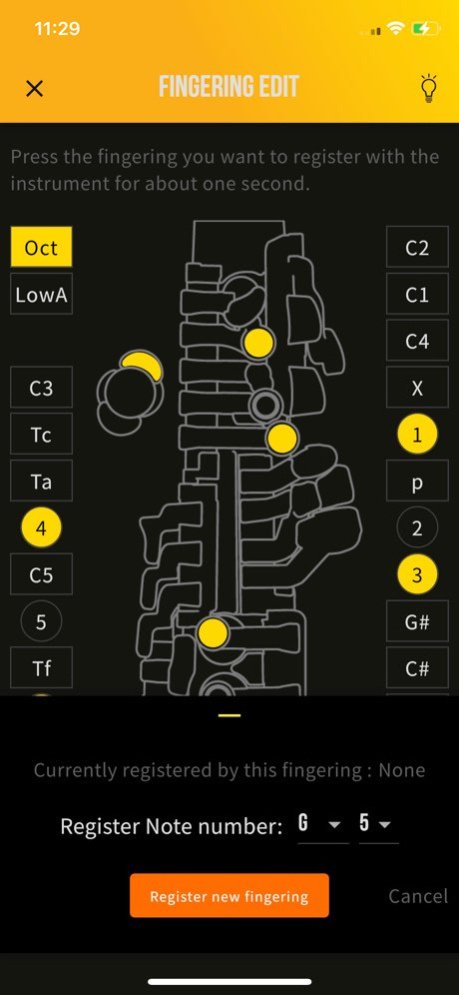
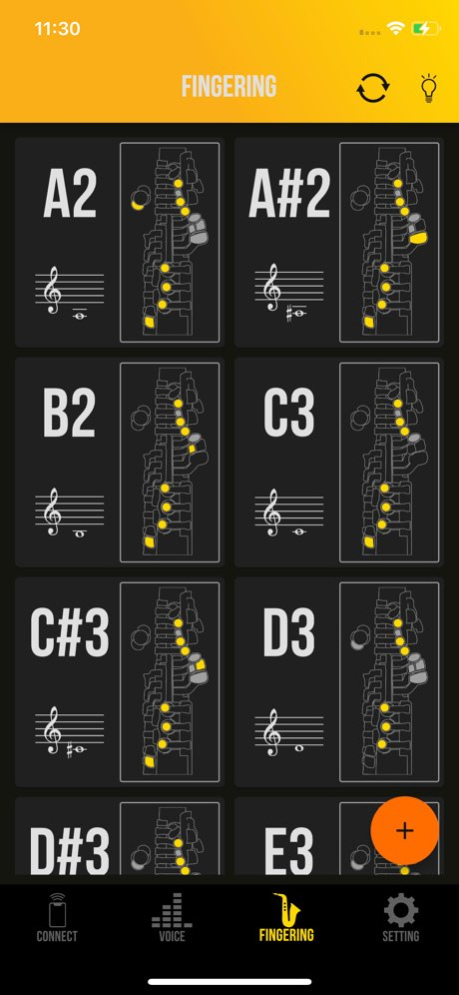
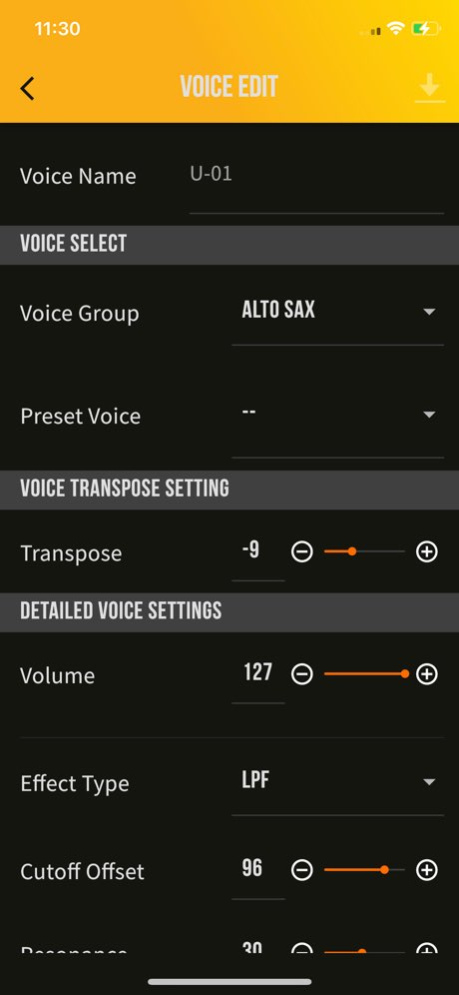
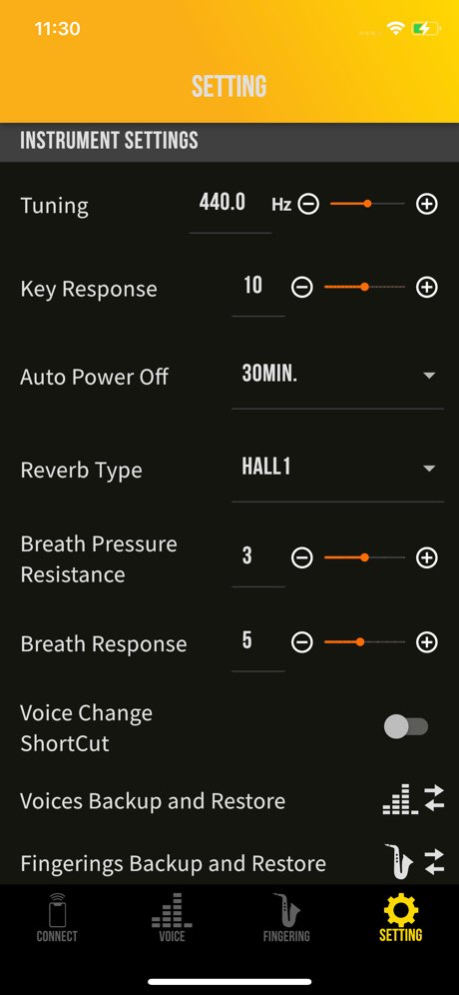
This dedicated app enhances the performance of the YDS-150 and further expands the range of sound creation-and includes instrument settings and sound editing. You can make detailed settings intuitively and visually from the app, that cannot be done on the instrument itself. ≪Function≫ * Editing voices You can easily change saxophone tones such as alto, soprano, tenor, and baritone tones, as well as synthesizer tones and shakuhachi tones. You can also adjust effects and make detailed sounds. * Edit fingering You can customize the fingertips by changing them or adding new ones. * Instrument settings You can adjust the blowing feeling such as breath resistance and response, and change the settings such as tuning. * Fingering list It is possible to display the registered fingers in a list. It is useful to check the fingering.
Previous Versions
Here you can find the changelog of YDS Controller since it was posted on our website on 2021-12-15 02:22:00.
The latest version is 3.0.0 and it was updated on 2026-10-09 00:43:15. See below the changes in each version.
YDS Controller version 3.0.0
Updated At: 2026-10-08
Changes: Version History - Support YDS-152/122 3.0.0 6d ago Minor bug fixes 2.3.1 Jun 4 - Minor bug fixes 2.3.0 Mar 17 - Updated the app icon.
- Minor bug fixes 2.2.1 11/05/2024 - Octave selector has been added to the FINGERING page.
- Fingering setting can be edited on the FINGERING DETAIL page.
- Breath sensor monitor has been added to the KEY DISPLAY page to monitor breath pressure. 2.1.0 04/30/2024 - Fixed minor bug 2.0.5 03/07/2024 Fixed minor bug 2.0.4 10/27/2023 - Fixed minor bug 2.0.2 08/10/2023 - fixed minor bug
- Added Chinese translation 2.0.1 07/25/2023 - YDS-120 is now supported.
- USB connection with instruments is now supported.
- An Adapter is required. For detailed instructions, please refer to WEB manual ( https://manual.yamaha.com/mi/common/iphone_ipad_connect/index.html )
-【NOTE】Some devices may not be able to support electric usage of the instrument; Therefore, playing at a high volume may cause disconnection. If this happens, we recommend using a power adapter. Please reopen the application and reconnect.
- Add MIDI OUT Settings
- You can make various settings when using the digital saxophone as a MIDI controller.
- The firmware V1.10 is required for use with YDS-150. You can get the update from YAMAHA Web Site ( https://www.yamaha.com/2/yds_series/ )(required PC)
- Bug Fix. 2.0 04/14/2023 Fix iOS16 connection issue 1.2 11/29/2022 - Add Preset Voice Set. You can select it in "SETTING > Backup and Restore Voices".
- Add Preset Fingering Set. You can select Trumpet, Flute, and Clarinet etc. fingerings in "SETTING > Backup and Restore Fingerings"
- Add Key Display functionality. You can check the Key Response individually.
- iTunes file sharing is available.
- Bug fix. 1.1.0 10/04/2021 - iOS 14 support.
- Bug Fix. 1.0.1 10/22/2020 1.0 09/24/2020
YDS Controller version 2.3.1
Updated At: 2026-10-01
Changes: Version History Minor bug fixes 2.3.1 Jun 4 - Minor bug fixes 2.3.0 Mar 17 - Updated the app icon.
- Minor bug fixes 2.2.1 11/05/2024 - Octave selector has been added to the FINGERING page.
- Fingering setting can be edited on the FINGERING DETAIL page.
- Breath sensor monitor has been added to the KEY DISPLAY page to monitor breath pressure. 2.1.0 04/30/2024 - Fixed minor bug 2.0.5 03/07/2024 Fixed minor bug 2.0.4 10/27/2023 - Fixed minor bug 2.0.2 08/10/2023 - fixed minor bug
- Added Chinese translation 2.0.1 07/25/2023 - YDS-120 is now supported.
- USB connection with instruments is now supported.
- An Adapter is required. For detailed instructions, please refer to WEB manual ( https://manual.yamaha.com/mi/common/iphone_ipad_connect/index.html )
-【NOTE】Some devices may not be able to support electric usage of the instrument; Therefore, playing at a high volume may cause disconnection. If this happens, we recommend using a power adapter. Please reopen the application and reconnect.
- Add MIDI OUT Settings
- You can make various settings when using the digital saxophone as a MIDI controller.
- The firmware V1.10 is required for use with YDS-150. You can get the update from YAMAHA Web Site ( https://www.yamaha.com/2/yds_series/ )(required PC)
- Bug Fix. 2.0 04/14/2023 Fix iOS16 connection issue 1.2 11/29/2022 - Add Preset Voice Set. You can select it in "SETTING > Backup and Restore Voices".
- Add Preset Fingering Set. You can select Trumpet, Flute, and Clarinet etc. fingerings in "SETTING > Backup and Restore Fingerings"
- Add Key Display functionality. You can check the Key Response individually.
- iTunes file sharing is available.
- Bug fix. 1.1.0 10/04/2021 - iOS 14 support.
- Bug Fix. 1.0.1 10/22/2020 1.0 09/24/2020
YDS Controller version 2.3.0
Updated At: 2026-05-28
Changes: Version History - Minor bug fixes 2.3.0 Mar 17 - Updated the app icon.
- Minor bug fixes 2.2.1 11/05/2024 - Octave selector has been added to the FINGERING page.
- Fingering setting can be edited on the FINGERING DETAIL page.
- Breath sensor monitor has been added to the KEY DISPLAY page to monitor breath pressure. 2.1.0 04/30/2024 - Fixed minor bug 2.0.5 03/07/2024 Fixed minor bug 2.0.4 10/27/2023 - Fixed minor bug 2.0.2 08/10/2023 - fixed minor bug
- Added Chinese translation 2.0.1 07/25/2023 - YDS-120 is now supported.
- USB connection with instruments is now supported.
- An Adapter is required. For detailed instructions, please refer to WEB manual ( https://manual.yamaha.com/mi/common/iphone_ipad_connect/index.html )
-【NOTE】Some devices may not be able to support electric usage of the instrument; Therefore, playing at a high volume may cause disconnection. If this happens, we recommend using a power adapter. Please reopen the application and reconnect.
- Add MIDI OUT Settings
- You can make various settings when using the digital saxophone as a MIDI controller.
- The firmware V1.10 is required for use with YDS-150. You can get the update from YAMAHA Web Site ( https://www.yamaha.com/2/yds_series/ )(required PC)
- Bug Fix. 2.0 04/14/2023 Fix iOS16 connection issue 1.2 11/29/2022 - Add Preset Voice Set. You can select it in "SETTING > Backup and Restore Voices".
- Add Preset Fingering Set. You can select Trumpet, Flute, and Clarinet etc. fingerings in "SETTING > Backup and Restore Fingerings"
- Add Key Display functionality. You can check the Key Response individually.
- iTunes file sharing is available.
- Bug fix. 1.1.0 10/04/2021 - iOS 14 support.
- Bug Fix. 1.0.1 10/22/2020 1.0 09/24/2020
YDS Controller version 2.3.0
Updated At: 2026-03-17
Changes: - Minor bug fixes
YDS Controller version 2.2.1
Updated At: 2024-11-05
Changes: Nov 5, 2024
Version 2.2.1
- Updated the app icon.
- Minor bug fixes
YDS Controller version 2.2.1
Updated At: 2024-11-05
Changes: - Updated the app icon.
- Minor bug fixes
YDS Controller version 2.1.0
Updated At: 2024-04-30
YDS Controller version 2.1.0
Updated At: 2024-04-30
Changes: Apr 30, 2024
Version 2.1.0
- Octave selector has been added to the FINGERING page.
- Fingering setting can be edited on the FINGERING DETAIL page.
- Breath sensor monitor has been added to the KEY DISPLAY page to monitor breath pressure.
YDS Controller version 2.0.5
Updated At: 2024-03-07
Changes: Mar 7, 2024
Version 2.0.5
- Fixed minor bug
YDS Controller version 2.0.4
Updated At: 2023-10-27
Changes: Oct 27, 2023
Version 2.0.4
Fixed minor bug
Disclaimer
Official App Store Link
We do not host YDS Controller on our servers. We did not scan it for viruses, adware, spyware or other type of malware. This app is hosted by Apple and passed their terms and conditions to be listed there. We recommend caution when installing it.
The App Store link for YDS Controller is provided to you by apps112.com without any warranties, representations or guarantees of any kind, so access it at your own risk.
If you have questions regarding this particular app contact the publisher directly. For questions about the functionalities of apps112.com contact us.